Give coding tasks from any browser
Open app.codestilt.com on any computer, even one without CodeStilt installed. Type a task, approve the plan, and watch it run on your linked PC.
Works in Chrome, Edge, Safari and Firefox.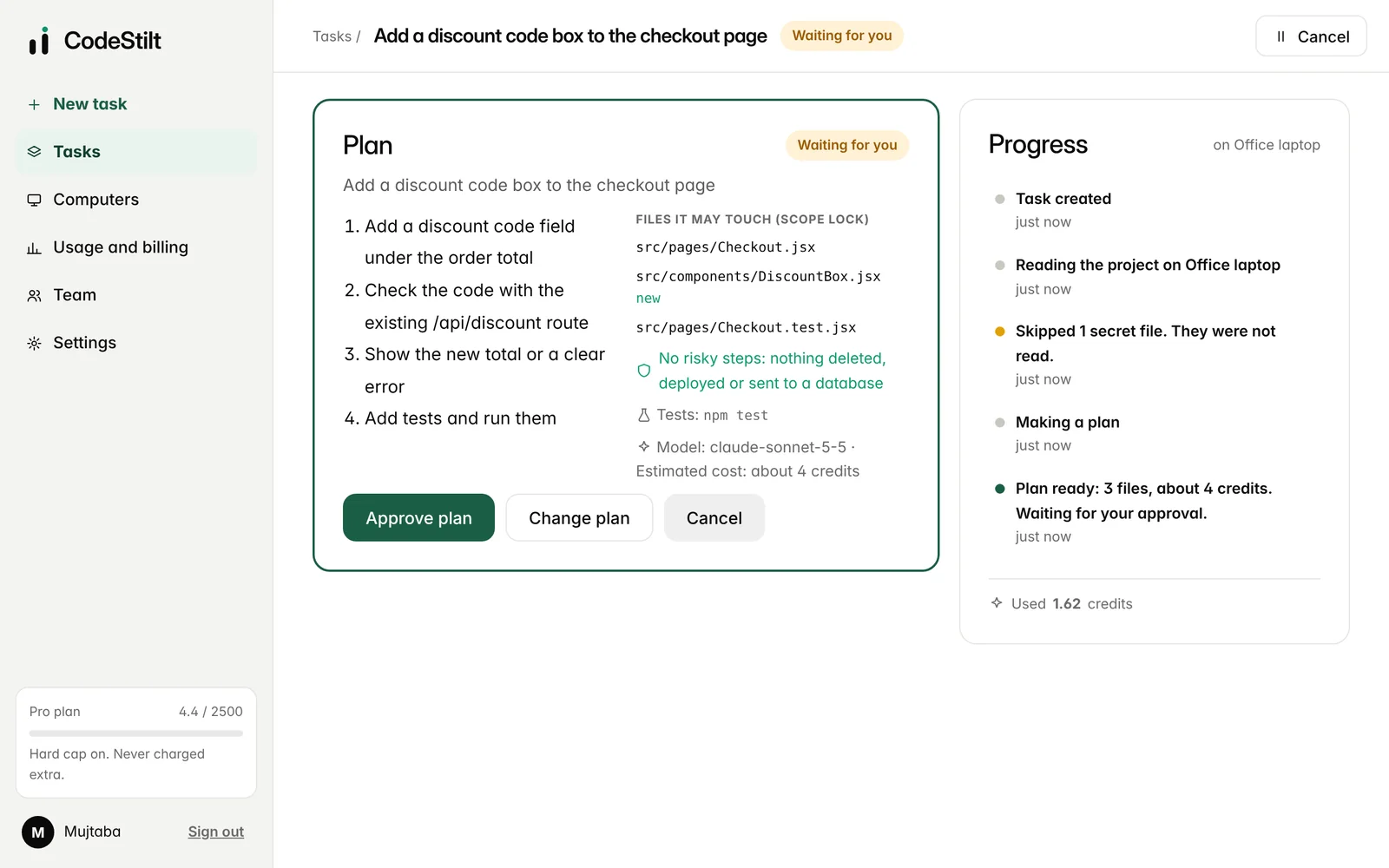
Everything from one page
New task
Type what you want in plain words, choose the project and the computer.
Plan and cost first
See each step, every file it may touch and the estimated credits.
Live progress
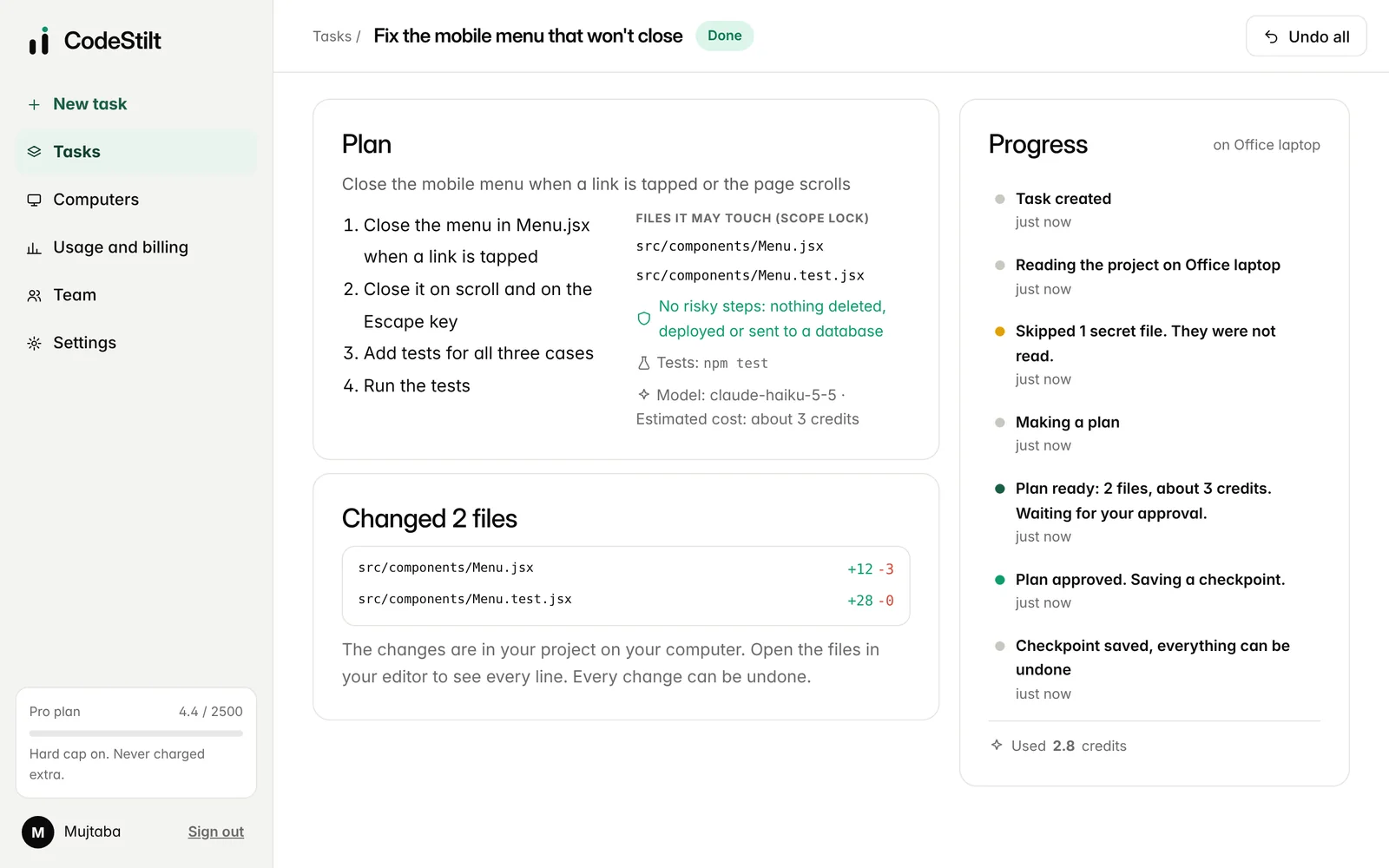
Watch each step as it happens, and see every file that changed.
Undo any task
Put a whole task back with one click, up to 7 days later.
All your computers
See which PCs are online and which folders each one allows.
Usage and cap
Credits used, cost per task and your monthly cap, always visible.
Start in three steps
Create an account
Sign in with Google, GitHub, or a code or link sent to your email.
Link a computer
Install the desktop app and confirm the link.
Give your first task
Type it, approve the plan, and you're done.
Everything happens on one page per task
Start a task in seconds
Type what you want, choose the computer, the folder and the mode, then click Make a plan or press Ctrl + Enter. Offline computers are marked so you know when a task will wait.
- Modes: Auto, Best quality, Fast and Saver
- Press N anywhere to start a new task
- Your 30 most recent tasks, with older ones below
Read the plan, then decide
The plan shows the summary, the steps, every file it may touch, risky steps it expects, the test command, the model and the estimated credits. Approve it with one click or Ctrl + Enter, ask for changes, or cancel.
- A changed plan is written again from scratch
- Nothing on your computer changes until you approve
- Unclear tasks get a question back instead of a guess
Watch it work, answer questions
The task page updates by itself as each step happens. When the danger wall needs you, the question appears right there, and on your phone, with Allow once and Block buttons.
- Close the tab, the task keeps running
- Notification when a plan or question needs you
- Changed files listed with lines added and removed
What each part of the dashboard is for
| Page | What you do there |
|---|---|
| Tasks | Type a new task, choose computer, folder and mode, and see recent tasks. |
| Task page | The plan, live progress, danger wall questions, changed files, test results and Undo all. |
| Computers | See which computers are online and their folders. Rename, pause, allow or block remote tasks, remove. |
| Usage and billing | Credits used this month, your hard cap and alert level, every charge, your plan and payments. |
| Team | Create a team, invite people, set roles and budgets, read the audit log. |
| Settings | Models, permissions and danger wall switches, rules and memories, notifications, network and account. |
Always know where a task is
| State | What is happening | What you can do |
|---|---|---|
| Making a plan | The project is read and the AI writes the plan | Cancel |
| Waiting for you | The plan is ready | Approve, change plan, cancel |
| Needs more detail | The task was unclear, so it asked instead of guessing | Add detail, or cancel |
| Running | Checkpoint saved, approved files being changed | Cancel |
| Danger wall question | A step needs your OK | Allow once or Block |
| Fixing a failed test | Tests failed, it is trying again with the error | Cancel |
| Done | Changes made and tests passed (or no tests set) | Review, Undo all |
| Stopped | Tests still failed after 3 tries, those tries were free | Undo all, or try again with more detail |
Web dashboard questions
Straight answers to the questions people ask us most.
Do I need to keep the browser open?
No. Once you approve a plan, the task runs on your computer. Close the tab and check back later, or get a notification when it's done.
What if my computer is off?
The task waits in a queue until the desktop app connects again, then it starts in order. You can also send it to another linked computer.
Can I use it on a computer that isn't mine?
Yes. The dashboard works in any browser. Sign in, give the task, and it runs on your own linked computer, not on the one you're using. Sign out when you're done.
Which browsers work?
Recent versions of Chrome, Edge, Safari and Firefox, on computers and phones.
Can I run several tasks at once?
Yes, up to your plan's limit: 1 on Free and Lite, 2 on Pro, 3 on Pro+ and 10 on Ultra. Tasks waiting for your approval don't count.
Where do I see what a task cost?
On the task page and under Usage and billing, which lists every charge this month next to your hard cap.
Start free. No card needed.
Download CodeStilt, link your computer, and give your first task in two minutes.