Download CodeStilt
Install it on the computer where your code lives. Then give tasks from the web or your phone.
CodeStilt Desktop
Links your computer to your account so tasks you approve on the web or phone run here.
Windows 10 and 1164-bit (x64) Windows on ARMARM64 macOS 12 or newerApple Silicon, via one command macOS 12 or newerIntel, via one command Linuxx64 and ARM64, via one command Version 1.0.0 · Release notes · SHA-256 checksums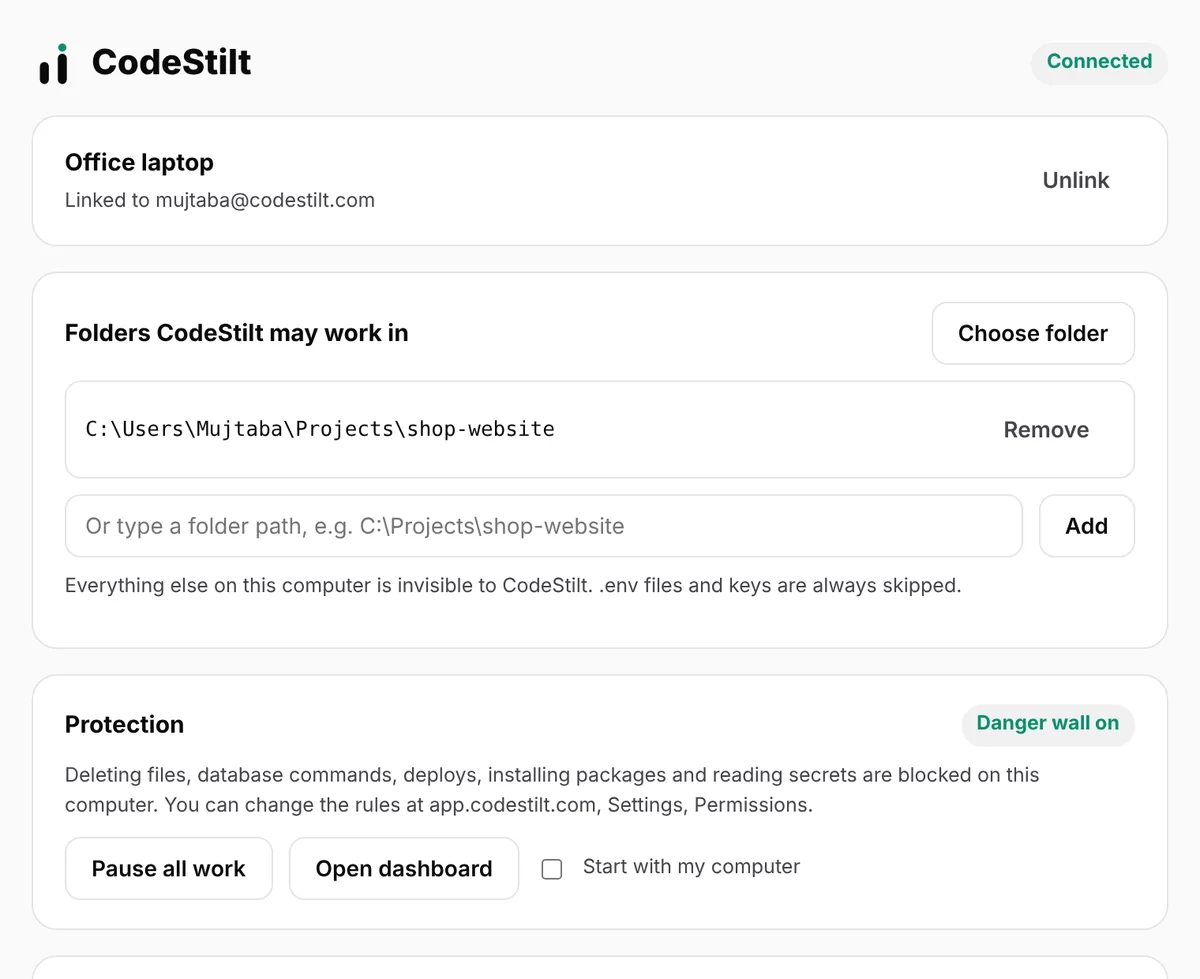
Mobile
Open app.codestilt.com on your phone and add it to your home screen. Works on iPhone and Android, nothing to download from a store.
How it worksCLI
Windows 10 or 11, macOS 12 or newer, or a recent Linux. About 20 MB of disk space and an internet connection. Git recommended.
CodeStilt works behind proxies and firewalls. It only connects to api.codestilt.com over HTTPS on port 443. Network guide
Up and running in two minutes
- 1
Download for your system
Windows: the CodeStilt .exe above. macOS and Linux: the one-line install command.
- 2
Open it
On Windows, double-click the file. On macOS and Linux, run
codestilt. The control panel opens in your browser. - 3
Sign in
Sign in with Google, GitHub, or a code or link sent to your email. You'll see your computer's name: confirm it and the link is done.
- 4
Allow a folder
Choose your project folder. CodeStilt can't see anything else on the computer.
- 5
Give a first task
Try something small, for example Add a footer with the current year to the home page.
- 6
Check the result
Read the changed files. Keep them, or click Undo all.
System requirements
| Windows | macOS | Linux | |
|---|---|---|---|
| Versions | 10 and 11 | 12 or newer | Recent 64-bit |
| Processors | x64, ARM64 | Apple Silicon, Intel | x64, ARM64 |
| Disk | About 20 MB plus checkpoints | Same | Same |
| Network | HTTPS to api.codestilt.com on port 443 | Same | Same |
| File | CodeStilt-windows-amd64.exe | Installed by the script | Installed by the script |
Check a download yourself
Every file has a published checksum
Every file's SHA-256 is listed at download.codestilt.com/checksums.txt. Compare it with the file you downloaded before you run it. The macOS and Linux install script does this for you.
- Windows:
certutil -hashfile FILE SHA256 - macOS:
shasum -a 256 FILE - Linux:
sha256sum FILE
PS> certutil -hashfile CodeStilt-windows-amd64.exe SHA256
SHA256 hash of CodeStilt-windows-amd64.exe:
3f9c... (compare with checksums.txt)
CertUtil: -hashfile command completed successfully.
Download questions
Straight answers to the questions people ask us most.
Which Windows file do I need?
Most PCs need the 64-bit (x64) file. Choose ARM64 only for Windows laptops with Snapdragon or other ARM processors.
Is there a Mac app I can drag to Applications?
Not yet. On macOS the one-line command installs CodeStilt, and running codestilt opens the same control panel as on Windows.
Do I need the CLI as well as the desktop app?
No. They are the same program. The CLI commands work as soon as the program is installed and on your PATH.
How do I update?
Download the new version and replace the old file. Your link, folders and settings are kept.
Do I need to install anything on my phone?
No. Open app.codestilt.com on your phone and add it to your home screen.
Two minutes to your first task
Install, sign in, pick a folder, type what you want.