Your computer does the work. You stay in charge.
The small CodeStilt app links your PC to your account. Tasks you approve on the web or phone run here, only inside the folders you allow.
Windows 10 and 11, macOS 12 or newer, Linux. About 7 MB.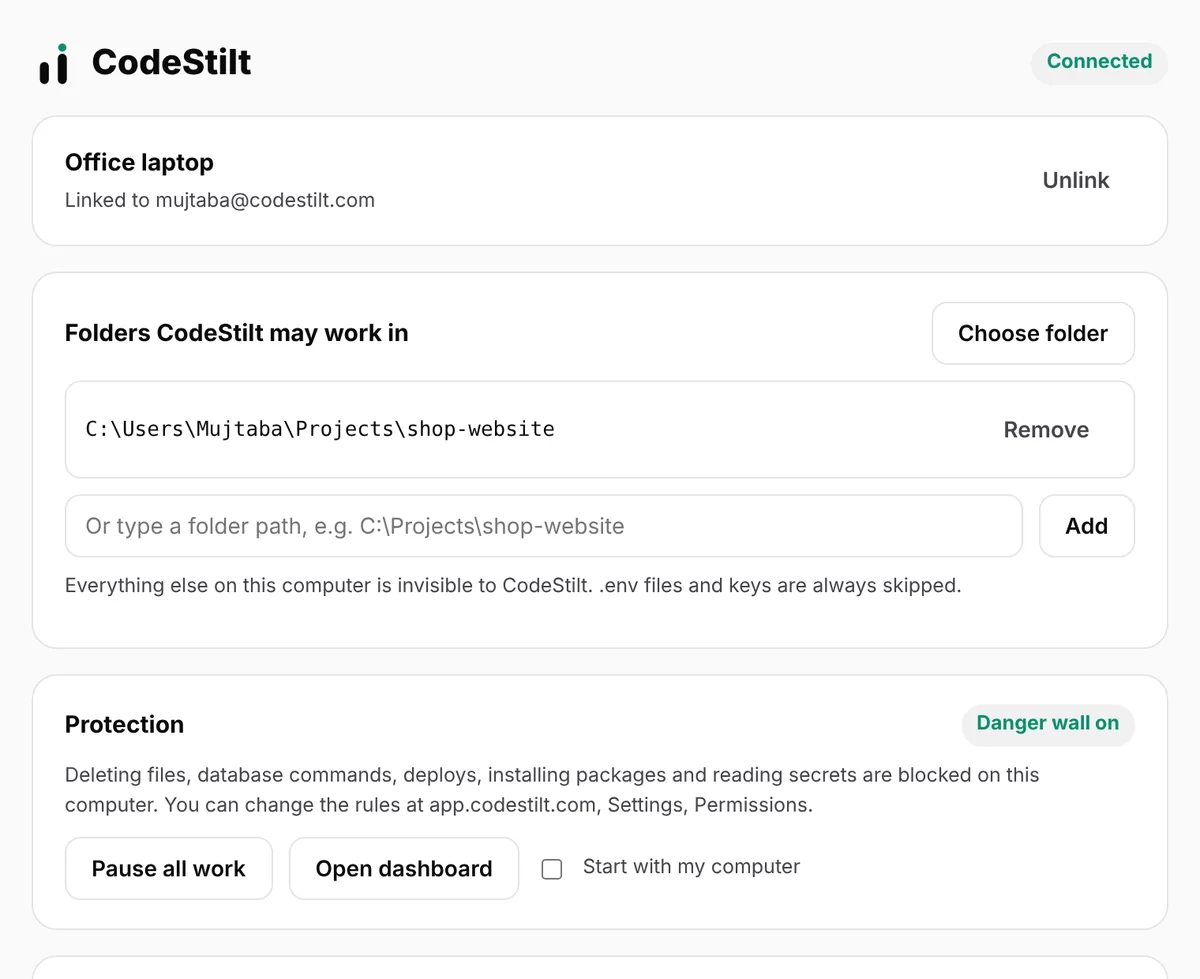
Small app, strong rules
Allowed folders
Choose exactly which projects it may open. Everything else is invisible to it.
Danger wall on your PC
Risky actions are blocked right on your machine, before they can run.
Pause anytime
One click in the app stops all work on this computer instantly.
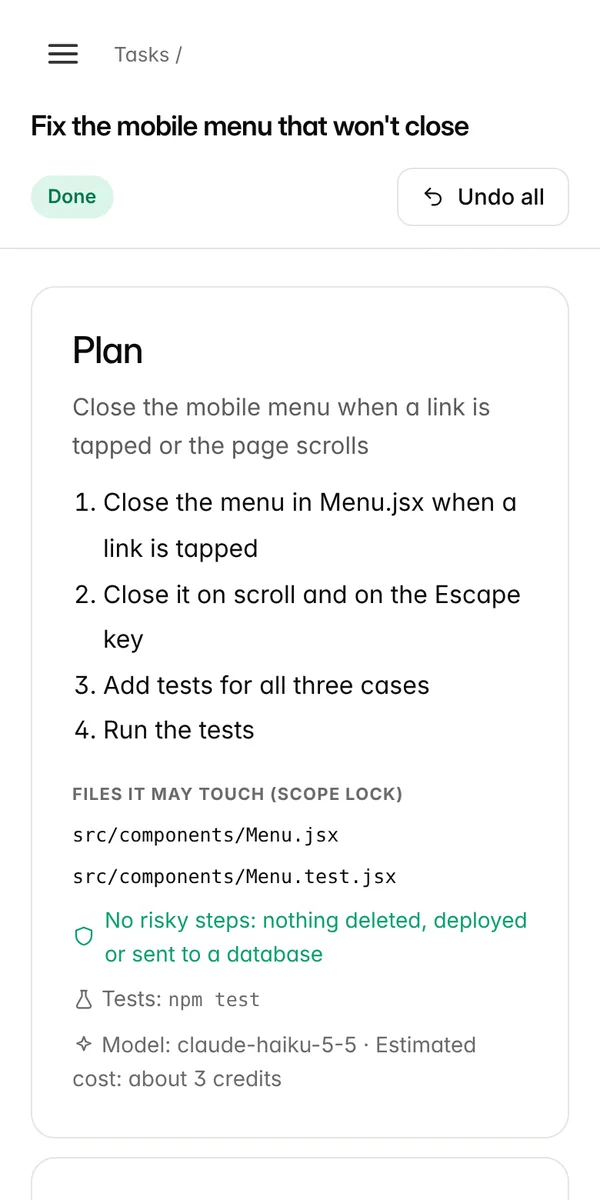
Checkpoint before every task
Your files are saved before each task, so one click puts them back.
Uses your tools
Runs your own tests, build commands and language versions.
Your sign-in stays safe
The link to your account is protected on your computer (encrypted on Windows, readable only by you on macOS and Linux), and you can unlink it any time.
Set up in two minutes
Download and open
On Windows, download CodeStilt and double-click it. On macOS and Linux, run the one-line install command.
Sign in
The app opens your browser to confirm it's you.
Allow a folder
Pick your project folder. That's it.
Small app, clear controls
Choose exactly which folders it may open
CodeStilt can only work inside its allowed folders. Everything else on the computer is invisible to it. Your whole home folder, a drive root such as C:\ and system folders are refused, so you always pick the project itself.
- Add a folder with Choose folder, or
codestilt allow . node_modules,.git,dist,vendorand caches are never read- Remove a folder and running tasks there stop at their next step
The danger wall lives here
Every command the AI suggests is checked by the desktop app before it runs. Never-allowed commands are refused, risky ones wait for your answer on the web, your phone or in the app, and known test commands run.
- Database, deploy and install rules are switches in Settings
- Secret files and outside folders are locked on
- Every allow or block is written in the task history
A checkpoint before every task
The files a task may change are copied into a checkpoint on your computer before the first change. Undo puts them back exactly, even if you don't use Git. Checkpoints older than 7 days are deleted automatically to save space.
- Undo from the web, your phone or
codestilt undo 42 - Files the task created are removed on undo
- Nothing else in the folder is touched
Runs on the computer you already have
| Windows | macOS | Linux | |
|---|---|---|---|
| Versions | Windows 10 and 11 | macOS 12 or newer | Recent 64-bit distributions |
| Processors | x64 and ARM64 | Apple Silicon and Intel | x64 and ARM64 |
| How you install | Download one .exe and open it, no installer | One command in Terminal | One command in a terminal |
| Where settings live | %APPDATA%\CodeStilt | ~/Library/Application Support/CodeStilt | ~/.config/codestilt |
| Your sign-in key | Encrypted for your Windows user | Readable only by your user | Readable only by your user |
| Network | HTTPS to api.codestilt.com, port 443 | Same | Same |
About 20 MB of disk space plus room for checkpoints. Nothing connects in to your computer, so no ports need to be opened.
Built to stay out of your way
Sleeps until needed
The app waits quietly for a task and uses very little memory while it waits.
Pause in one click
Pause stops all work on this computer instantly. Resume when you're ready.
Works when you're away
Leave the computer on with the app running and approve tasks from your phone.
Start with your computer
Turn it on in the app, or run codestilt startup on, so it's always ready.
Company networks
Uses your system proxy and your computer's own certificate store, so company HTTPS inspection works.
Unlink any time
Remove the computer in the dashboard and its access key stops working straight away.
Desktop app questions
Straight answers to the questions people ask us most.
Does it slow down my computer?
No. It sleeps until a task arrives. While a task runs, the heavy work is your own test command, the same as when you run it yourself.
Can it see my other files?
No. It can only open the folders you allowed. Inside them, secret files such as .env, keys and credentials are always skipped, and folders like node_modules and .git are never read.
Why is there no installer on Windows?
The Windows app is a single file. Double-click it and the control panel opens in your browser at a private local address. Move the file somewhere permanent before turning on Start with my computer.
Windows says it protected my PC. Is that safe?
New programs show this until enough people have installed them. Check the file's SHA-256 against download.codestilt.com/checksums.txt, then click More info and Run anyway. The Troubleshooting page in the docs shows each step.
What happens if my computer goes to sleep during a task?
The task waits. When the app connects again it continues with the next step. Tasks you give while it's offline wait in a queue.
How do I update?
Download the new version the same way and replace the old file. Your link, folders and settings are kept. codestilt status shows your version and the latest one.
How do I remove it completely?
Remove the computer under Computers in the dashboard (or run codestilt unlink), turn off start with computer, then delete the program file and the CodeStilt data folder.
Start free. No card needed.
Download CodeStilt, link your computer, and give your first task in two minutes.